Best pairs

i12 TWS Earbuds Charging Instructions: Case Lights, Battery Life and Fixes

Stem-style i12 TWS earbuds charge in two steps: the cable fills the case, and the case fills the buds whenever they sit inside. Get that rhythm right and a pair lasts days between plug-ins.

Freshly checked September 2026
Quick answer

Plug the case into any USB phone charger or laptop port with its USB-C cable, and drop the buds in so the magnets click them onto their contacts. Most makers quote 1 to 1.5 hours for a full charge, and the buds recharge from the case every time you put them away.

  • Digits on the case count up to 100 while it charges
  • Buds only charge when they sit flat on their contacts
  • No light at all? Try another cable and clean the pins
1 TAGRY X08
Charge on a pad or a cable TAGRY X08
The TAGRY X08 case takes a wireless charging pad or USB-C and counts its charge up to 100 on the front.
  • Silicone tips seal out street noise
  • Case shows the battery in digits
  • Bluetooth 5.x · 60h with case
Grab this pair
2 Fhumsh A10
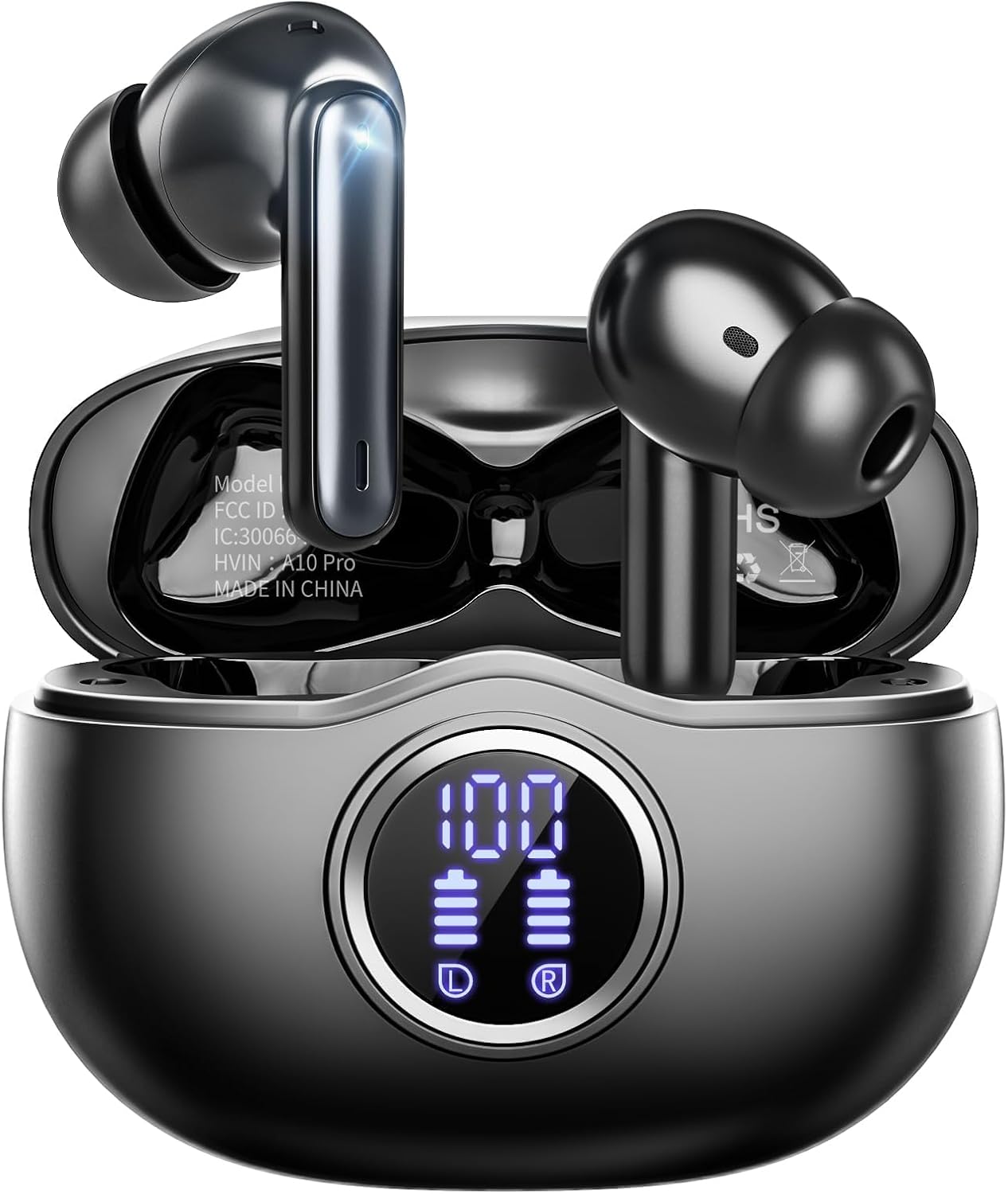
Digits for every part Fhumsh A10
The Fhumsh A10 display shows the case and each bud from 0 to 100%, with a full recharge in 1.5 hours.
  • Silicone tips seal out street noise
  • Case shows the battery in digits
  • Bluetooth 5.3 · 50h with case
Grab this pair
3 KTGEE T08
Fast top-up before a run KTGEE T08
Fifteen minutes on the cable gives the KTGEE T08 up to 90 minutes of music.
  • Open fit, no ear tips: the classic i12 shape
  • Case shows the battery in digits
  • Bluetooth 5.3 · 40h with case
Grab this pair

Give the case and buds a full first charge

New earbuds usually arrive with some charge, but not a full tank. One complete charge before the first long listen sets you up nicely and lets you see every light working.

  1. Use the cable in the box. Nearly every pair here charges over USB-C, and the cable plugs into a standard USB phone charger, a laptop port or a power bank.
  2. Put both buds in the case. Let the magnets pull each one down onto its metal contacts; a bud that sits high will not charge.
  3. Close the lid and plug the case in.
  4. Wait for the full reading. Makers quote 1 to 1.5 hours for a full charge, such as 1 hour for the Jxrev J51 case and 1.5 hours for the Fhumsh A10, BESNOOW I53 and Jrwaro S13.

From then on, charging looks after itself. Every time the buds go back in the case, they top up from the case battery, and the case only needs the cable once its own charge runs low.

A bud that refuses to charge from day one often still wears its transport sticker: a scrap of clear plastic over the gold dots. Peel it away and drop the bud back in.

Any USB phone plug works as an i12 TWS earbuds charger. A fast wall charger is fine too, though it won't make most pairs fill much faster. The case takes the power it is built for and ignores the rest.

Cheat card

Charge times and playtime pair by pair

PairOne chargeWith the caseFull rechargeQuick top-up
TAGRY X086 h60 h (buds used in turn)Not statedWireless pad or USB-C
Fhumsh A108 h50 h1.5 hNot stated
BESNOOW I538 h48 h1.5 hNot stated
zakotu I668 h40 h1.5 h10 min for 2 h
Jxrev J538 h40 h1 h (buds)Not stated
KTGEE T088 h40 hNot stated15 min for 90 min
HUIFU T128 h40 hNot stated15 min for 90 min
T21 Touchscreen8 h40 hNot stated10 min for 2 h
Wekily S506-8 h48 hNot stated10 min for 1 h
1 Hora AUT2015 h22 hNot statedNot stated

Figures as each maker states them. KTGEE rates its hours at 50-60% volume; louder listening and noise cancelling shorten every figure.

Read the 1-to-100 digits and the case lights

Most popular stem pairs now have a small digit display on the case. It answers the question plain cases leave you guessing about: how much charge is left, right now.

  • TAGRY X08: while the case charges, its display counts up from 1 to 100. Put the buds in and they start charging straight away.
  • Fhumsh A10: the display shows live levels for the case and for each bud, from 0 to 100%.
  • Jrwaro S13: the case shows its own level from 1 to 100% and a separate battery icon for each bud.
  • Jxrev J53 and zakotu I66: the display shows the case and each bud, so a flat side stands out at once.

Plain cases, like the one on the 1 Hora AUT201 or the Jxrev J51, use a small light instead of digits. Colours and blink patterns vary from pair to pair, so keep the printed card handy; a common pattern is a light that stays on or blinks while charging and changes or goes out when full.

Case typeWhat it tells you
Digit displayExact case level, often each bud too
Single lightCharging or full, roughly
TouchscreenBattery percentage on the screen

A reading that jumps around in the first minute after plugging in is normal. Give it a moment to settle before worrying.

Bud vs bud

Cases that charge fast or charge wirelessly

TAGRY X08 TAGRY X08 Fhumsh A10 Fhumsh A10 KTGEE T08 KTGEE T08 zakotu I66 zakotu I66 HUIFU T12 HUIFU T12 DRQQ AirBuds 2 DRQQ AirBuds 2
FitIn-ear tipsIn-ear tipsOpen fitIn-ear tipsIn-ear tipsOpen fit
BluetoothBluetooth 5.xBluetooth 5.3Bluetooth 5.3Bluetooth 5.4Bluetooth 5.3Bluetooth 5.1
Battery with case60h with case50h with case40h with case40h with case40h with case30h with case
CaseLED displayLED displayLED displayLED displayLED displayPlain
Water ratingIPX5IPX7IPX7IPX7IPX7IPX5
Call mics—ENC call mics—ENC call mics—ENC call mics
ControlsTouchTouchTouchTouchTouchTouch
Grab this pair Grab this pair Grab this pair Grab this pair Grab this pair Grab this pair
Spec card

Spec cards for the top three

TAGRY X08
TAGRY X08
Model
TAGRY X08
Fit
In-ear stem buds, silicone tips (S/M/L)
Bluetooth
Bluetooth 5, about 10m (33ft) range
Auto-connect
Hall switch: buds reconnect when the lid opens
Driver
13mm dynamic, triple-layer composite diaphragm
Impedance
32 ohm
Sensitivity
99dB
Frequency range
20Hz to 20kHz
Playtime per charge
Up to 6 hours
Total with case
Up to 60 hours (one bud at a time)
Case battery
470mAh, about 4 extra full charges
Charging
USB-C cable or any Qi wireless pad
Pair notes →Grab this pair
Fhumsh A10
Fhumsh A10
Model
Fhumsh A10 (shows as A10 Pro in Bluetooth)
Fit
In-ear stem buds, gel tips in S, M and L
Bluetooth
Bluetooth 5.3, up to 15m range
Pairing
Auto-connects when taken from the case; two-device pairing
Driver
13mm dynamic
Latency
Under 0.05s, as quoted by Fhumsh
Playtime per charge
Up to 8 hours
Total with case
Up to 50 hours
Charging
USB-C fast charging, about 1.5 hours to full
Case display
LED percent (0–100%) for the case and each bud
Water resistance
IPX7, waterproof mesh and inner nano-coating
Call mics
ENC noise cancelling, beamforming
Pair notes →Grab this pair
KTGEE T08
KTGEE T08
Model
KTGEE T08
Fit
U-shaped semi-in-ear, open, no ear tips
Shell
TPU, 65:35 inner-to-outer weight balance
Bluetooth
Bluetooth 5.3 with flash pairing, about 12m range
Latency
About 0.05s, as quoted by KTGEE
Driver
13.2mm dynamic, titanium-plated diaphragm
Impedance
32 ohm
Frequency range
20Hz to 20kHz
Playtime per charge
Up to 8 hours at 50–60% volume
Total with case
Up to 40 hours
Quick charge
15 minutes for about 90 minutes of music
Case battery
500mAh
Pair notes →Grab this pair

Turn 60 hours on the box into real listening time

The big number on a pair's box is the buds plus every refill the case can give. The number that matters on a commute is the smaller one: how long one charge in your ears lasts.

Most stem pairs here play 5 to 8 hours per charge, and the jaddsa T18 claims 9. The case then refills them several times, which is where totals of 40, 50 or 60 hours come from.

Read the fine print on the biggest figures. The TAGRY X08 maker counts its 60 hours with the buds used in turn, one at a time. Each bud lasts 6 hours and the 470mAh case refills both about four times, so two buds playing together works out closer to 30 hours of stereo. That is still plenty for a week of commuting.

  • Volume matters. KTGEE rates the T08's 40 hours at 50 to 60% volume; louder listening drains faster.
  • Noise cancelling costs charge. ANC on pairs like the CuiSuto M28 and Bucephalus T20 uses extra power while it runs.
  • Refills lose a little. Some energy turns to heat each time the case tops up the buds, so real totals land a bit under the box figure.
  • Cold weather shortens any lithium battery for a while; the time comes back once the buds warm up.

For a long flight, pick a pair with a high per-charge figure, since you may not want to pause for a refill. For a daily commute, the case total counts for more.

Happy pick

Open-fit buds that top up on a pad

DRQQ AirBuds 2
Best for a wireless charging pad DRQQ AirBuds 2

The DRQQ AirBuds 2 case charges on a wireless pad or over USB-C, and the open-fit buds carry ENC call mics and an IPX5 rating. Leave the case on the pad overnight and the pair is ready by breakfast.

Grab this pair

Top up in ten minutes or on a Qi pad

Forgot to charge before heading out? Several pairs are built for exactly that morning. A short plug-in gives you enough music for the trip.

  • zakotu I66 and T21 Touchscreen Earbuds: 10 minutes on the cable for about 2 hours of playtime.
  • KTGEE T08, Qecnato I50 and HUIFU T12: 15 minutes for about 90 minutes.
  • Wekily S50: 10 minutes for about an hour of music.

Three pairs skip the cable altogether. The TAGRY X08, the DRQQ AirBuds 2 and the PR-4 Wireless-Charging Earbuds all have cases that charge on a standard wireless charging pad, the same kind many phones use.

  1. Lay the case flat, lid up, in the middle of the pad.
  2. Look for the pad's light or the case digits to confirm charging has started.
  3. Slide it a little if nothing happens; the coils need to line up.

Take any keys, coins or metal clips off the pad first. Metal between the coils blocks charging and can make the pad warm, and a silicone skin on the case should stay thin enough for the pad to reach through.

A small power bank works just as well as a wall plug for the cable top-ups, which makes the fast-charge pairs a good match for long travel days and festival weekends.

Wireless charging is slower than the cable, so it suits overnight or a desk during the working day. Keep the cable for mornings when time is short.

Pictured

Total hours with the charging case

Maker-stated total playtime with the case, September 2026. Some makers count the buds used one at a time, so stereo listening runs shorter.

Fix a case that won't charge or a bud that stays flat

i12 TWS earbuds not charging, and nothing lights up? Work through the simple things first. Charging trouble almost always comes down to the cable, the port or the contacts, not a broken battery.

  1. Swap the cable and the charger. Cheap cables fail often, and some thin cables carry power poorly. Try the one from your phone.
  2. Check the port. Pocket lint packs into a USB-C port. Shine a light in and ease it out with a wooden toothpick, never metal.
  3. Clean the contacts. Rub the gold dots on each bud and the little spring-loaded posts in the case with a clean, dry swab.
  4. Reseat the buds. Press each one down until the magnets hold it; watch the digits or light respond.
  5. Leave it longer. A case that sat empty for months may show nothing for the first half hour on the cable.

If the case charges but one bud stays at zero, the problem sits with that bud's contacts. If the bud charges but plays in only one ear, it is a pairing slip, and the left and right reset fixes it.

Storing a pair for a while? Leave the case about half charged and give it a top-up every couple of months, which keeps a lithium battery happiest.

With charging sorted, the tap controls and pairing steps are the only other things to learn.

Quick answers

First-pair questions

How do I charge i12 TWS earbuds?

Put both buds in the case so the magnets hold them on their contacts, close the lid and plug the case into a USB charger or laptop with the included cable, usually USB-C.

What is the i12 TWS earbuds battery life?

Most stem pairs play 5 to 8 hours per charge, with totals of 20 to 60 hours counting the case refills. Volume, calls and noise cancelling all shorten the real figure.

How long does the case take to charge?

Makers quote 1 to 1.5 hours for a full charge on most pairs, such as 1 hour for the Jxrev J51 case and 1.5 hours for the Fhumsh A10.

Why is my i12 TWS earbuds case not charging?

Try a different cable and charger, clear lint from the port, and leave it plugged in for half an hour. A case that shows nothing after that may be faulty.

Can I use a wireless charger?

Only with a case built for it. The TAGRY X08, DRQQ AirBuds 2 and PR-4 Wireless-Charging Earbuds charge on a wireless pad; the rest need the cable.

Next quick fix

More earbud fixes

More pairs

More pairs with long-lasting cases