Best pairs
i12-style in-ear buds · touchscreen case · ANC

CuiSuto M28 Touchscreen

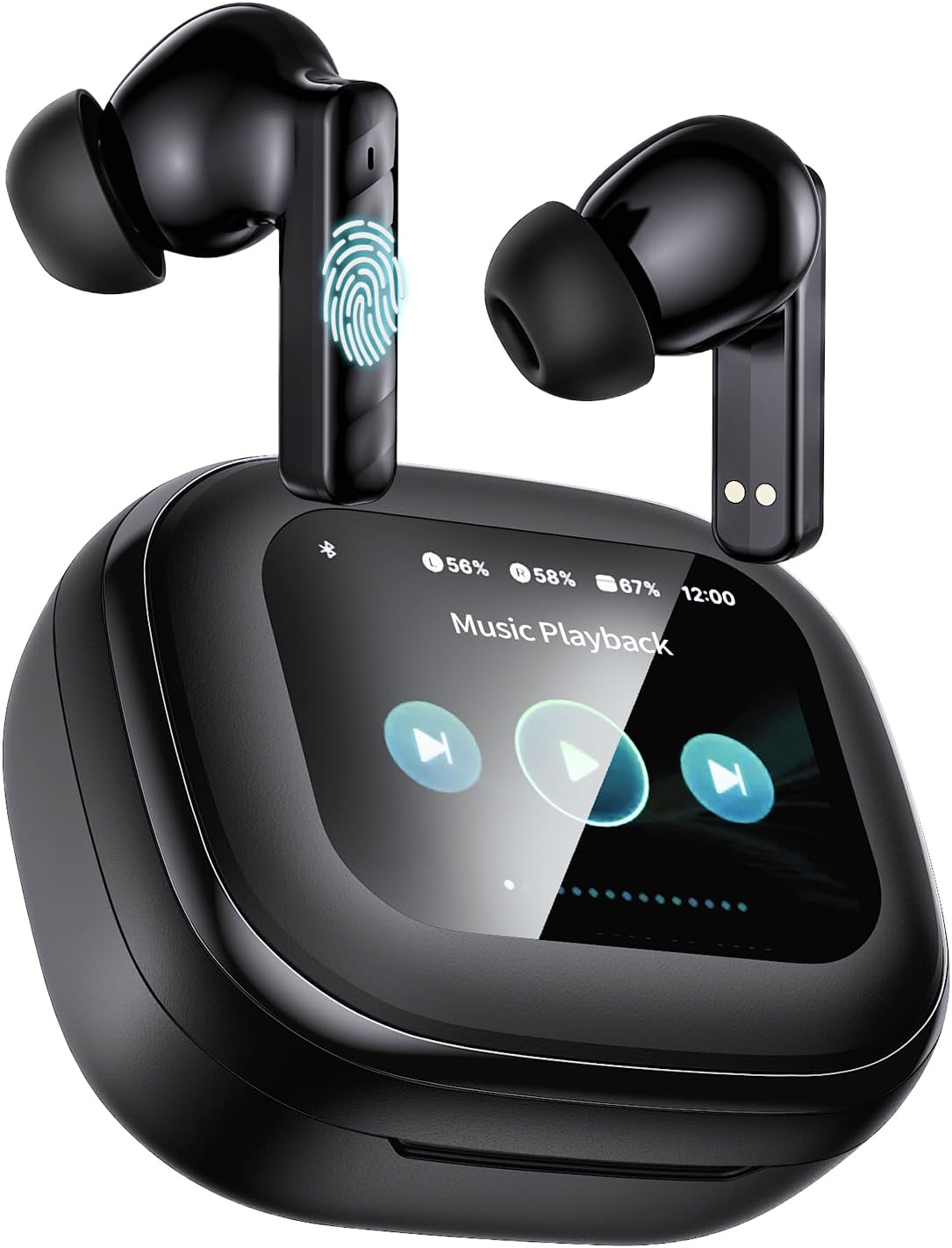
Black stem earbuds with active noise cancelling and a charging case that has its own touchscreen for volume, tracks, calls, noise modes and finding a lost bud.

  • FitIn-ear, silicone tips
  • CaseTouchscreen for music, calls and ANC
  • NoiseActive noise cancelling, 4 modes
  • BatteryUp to 60h with the case
  • Sound13mm drivers, 5 EQ presets
  • Bluetooth5.4
Lovely for
  • You want to skip songs and set volume without unlocking your phone
  • Buses, planes and open offices call for active noise cancelling
  • Long weeks away from a charger
  • You lose buds and like a find-my-bud button
Skip if
  • Swimmers or heavy-rain runners: no IP number is given
  • You prefer the open i12 fit with no tips
  • A plain case with fewer buttons suits you better
Grab this pair

Run music and ANC from the M28's touchscreen case

The CuiSuto M28 moves the controls from your phone to the case. Its charging case carries a small touchscreen that turns the volume up or down, skips tracks, handles calls, switches noise cancelling modes and helps you find a missing bud. The buds themselves are black in-ear stems with silicone tips, linked over Bluetooth 5.4.

A screen on the case sounds like a gimmick until you try it with gloves on, or with the phone buried in a backpack. Tap the case, the song changes, and the phone stays put.

What the M28's screen handles for you:

  • Volume and tracks. Turn it up, turn it down, skip forward or back.
  • Calls. Answer and end a call from the case.
  • Noise modes. Pick one of four noise cancelling settings.
  • Find my buds. Trigger a sound in a lost bud so you can follow it to the sofa cushion.
The buds still have their own touch pads. The screen is a second remote, handy when tapping your ear isn't practical, like on a crowded train with your hands full.

The styling leans premium. The stems have smooth curves and a metallic finish, and the pocket-sized case keeps its screen facing up when it rests on a table.

The screen also doubles as a small clock, so a glance at the case on your desk tells you the time as well as the battery. Battery reaches up to 60 hours with the case, one of the higher totals among touchscreen pairs, so the screen doesn't come at the cost of hours. The case charges over a USB-C cable.

If you've never used a screen case before, the touch controls cheat card explains how case controls and bud taps split the work.
Spec card

Every number on the box

SpecValue
ModelCuiSuto M28
FitIn-ear stem buds, silicone tips
Bluetooth5.4
Noise controlActive noise cancelling, 4 adjustable modes
Case screenTouchscreen: volume, tracks, calls, ANC modes, find buds
Driver13mm dynamic
Impedance13 ohm
Frequency response20Hz to 20kHz
Sound modes5 EQ presets
Total with caseUp to 60 hours
ChargingUSB-C cable
Bud weight0.13oz (about 3.7g) each
FinishMetallic stem design
ResistanceSweat- and dust-resistant (no IP number given)
ControlsTouch on the buds and on the case screen
ColorBlack
In the boxCharging case with buds, USB-C cable, user manual

Four ANC modes and five EQ presets on the M28

Active noise cancelling is the M28's other headline. Microphones listen to the sound around you and the drivers play an opposite signal to cancel it, which works best on steady rumble like engines, air conditioning and road noise. The M28 lets you choose between four noise cancelling modes from the case.

Paired with the seal from silicone tips, ANC makes a real difference on a bus or plane. Voices and sudden clatters get through more than steady hum does, which is how ANC behaves on nearly every pair.

How the M28's sound settings fit different days:

SettingWhen it helps
ANC onFlights, trains, open offices
Lighter or offWalks near traffic, where you need to hear what's around you
EQ presetsBass for workouts, clearer voices for podcasts

The 13mm dynamic drivers cover 20Hz to 20kHz, and the 13-ohm impedance means any phone drives them easily. Five EQ presets let you tilt the sound toward bass, vocals or a flatter balance without an app.

Where the M28 makes the most sense:

  • Commuters who want to switch ANC on and off without unlocking a phone.
  • Travelers who need long battery and a quieter cabin.
  • Office workers taking calls, with the case on the desk as a remote.
  • Anyone who keeps misplacing buds and wants the find feature.

ANC also helps on calls. With less background rumble in your ears, it's easier to hear the other person, and the maker says the noise cancelling keeps calls clear in busy places. For a phone-heavy day at a desk, set the case beside the keyboard and use it to answer.

Keep in mind that ANC uses some extra battery. Running it all day will pull the real total below the 60-hour figure, so switch it off on quiet walks to stretch the charge.

Among the pairs

Where this pair lands

i12 TWS earbuds models by fit and case, September 2026. Highlighted: CuiSuto M28 Touchscreen.

Pair the M28, then find a lost bud from the screen

Setting up the M28 is the same as any stem pair: open the case, let the buds wake, and pick them in your phone's Bluetooth menu. The screen comes into its own once they're connected, so give it a first charge and a quick tour before heading out.

  1. Charge the case fully with the USB-C cable before first use.
  2. Open the lid and take out the buds; they switch on and link to each other.
  3. Choose the M28 in the Bluetooth list on your iPhone, Android phone or laptop.
  4. Wake the case screen and try volume and track skip while a song plays.
  5. Cycle through the four noise modes and settle on your favorite.

Pairing details for each type of device sit in the pairing guide. If only one side plays after setup, the left and right reset relinks them in a minute.

Fit tips for the in-ear design:

  • Start with the medium tips and switch if the bass sounds thin.
  • Twist each bud slightly so the stem points down to your jaw.
  • A good seal improves ANC as much as it improves bass.

Each bud weighs about 3.7 grams, light enough for long sessions. The maker describes the buds as sweat- and dust-resistant, which covers gym sessions and walks, though no IP number is given, so keep them away from showers and heavy rain.

A touchscreen case lives in pockets full of keys and coins. A soft pouch or a separate pocket keeps the screen free of scratches.
Trade-ins

Three other pairs to try

1 Bucephalus T20 Touchscreen
Screen case with ENC call mics Bucephalus T20 Touchscreen
The Bucephalus T20 pairs a touchscreen case with ENC mics and 48 hours of play on Bluetooth 5.4.
  • Silicone tips seal out street noise
  • Touchscreen case runs the music
  • Bluetooth 5.4 · 48h with case
Grab this pair
2 T21 Touchscreen Earbuds
Screen case rated IPX7 T21 Touchscreen Earbuds
The T21 Touchscreen adds IPX7, hybrid ANC with transparency mode and a camera remote on the case.
  • Silicone tips seal out street noise
  • Touchscreen case runs the music
  • Bluetooth 5.3 · 40h with case
Grab this pair
3 TAGRY X08
No screen, wireless charging TAGRY X08
The TAGRY X08 matches the 60-hour total with an LED case that charges on a Qi pad.
  • Silicone tips seal out street noise
  • Case shows the battery in digits
  • Bluetooth 5.x · 60h with case
Grab this pair

CuiSuto M28 beside the T21 and Bucephalus T20 screens

Touchscreen cases have become a small family of their own among stem earbuds. The M28 leads its group on battery, while the others trade hours for extras like an IPX7 rating or ENC call mics. Here's how the three compare.

SpecCuiSuto M28T21 TouchscreenBucephalus T20
Bluetooth5.45.35.4
With case60h40h48h
Driver13mm14.2mm13mm
WaterSweat-resistantIPX7Not listed
NoiseANC, 4 modesHybrid ANC, transparencyANC

Pick the M28 if:

  • Battery life comes first: 60 hours is the most in this group.
  • You want Bluetooth 5.4 and a choice of noise modes.
  • A metallic, premium look matters to you.

The T21 Touchscreen suits gym-goers with its IPX7 rating and transparency mode, and it adds a camera remote on the case. The Bucephalus T20 brings ENC call mics for people who spend their day on the phone.

Three things to be sure of:

  • You're happy charging by USB-C cable.
  • Silicone tips feel fine in your ears.
  • You'll treat the case screen with a little care in pockets and bags.

Screen cases no longer sit only at the top of the range. The price bands show where screen pairs start and what each step up adds.

One more way to decide: think about where your phone lives. If it's always in your hand, bud taps are enough and a plain LED case will do. If it spends the day in a bag, a desk drawer or a jacket on the back of a chair, the M28's screen saves a lot of digging.

Quick answers

Before these go in your ears

What can the CuiSuto M28 touchscreen do?

It changes the volume, skips tracks, handles calls, switches between four noise cancelling modes and helps you find a lost bud, all without your phone.

Does the M28 have real active noise cancelling?

Yes. The M28 has active noise cancelling with four adjustable modes, set from the case. It works best on steady noise like engines and air conditioning.

How long does the M28 battery last?

Up to 60 hours with the case. Using ANC all the time pulls that figure down, so switch it off when you don't need it.

Is the M28 waterproof?

The maker calls it sweat- and dust-resistant but gives no IP number. It's fine for workouts; keep it away from showers, pools and heavy rain.