Best pairs

i12 TWS Touch Controls: Every Tap for Music, Calls, Volume and Siri

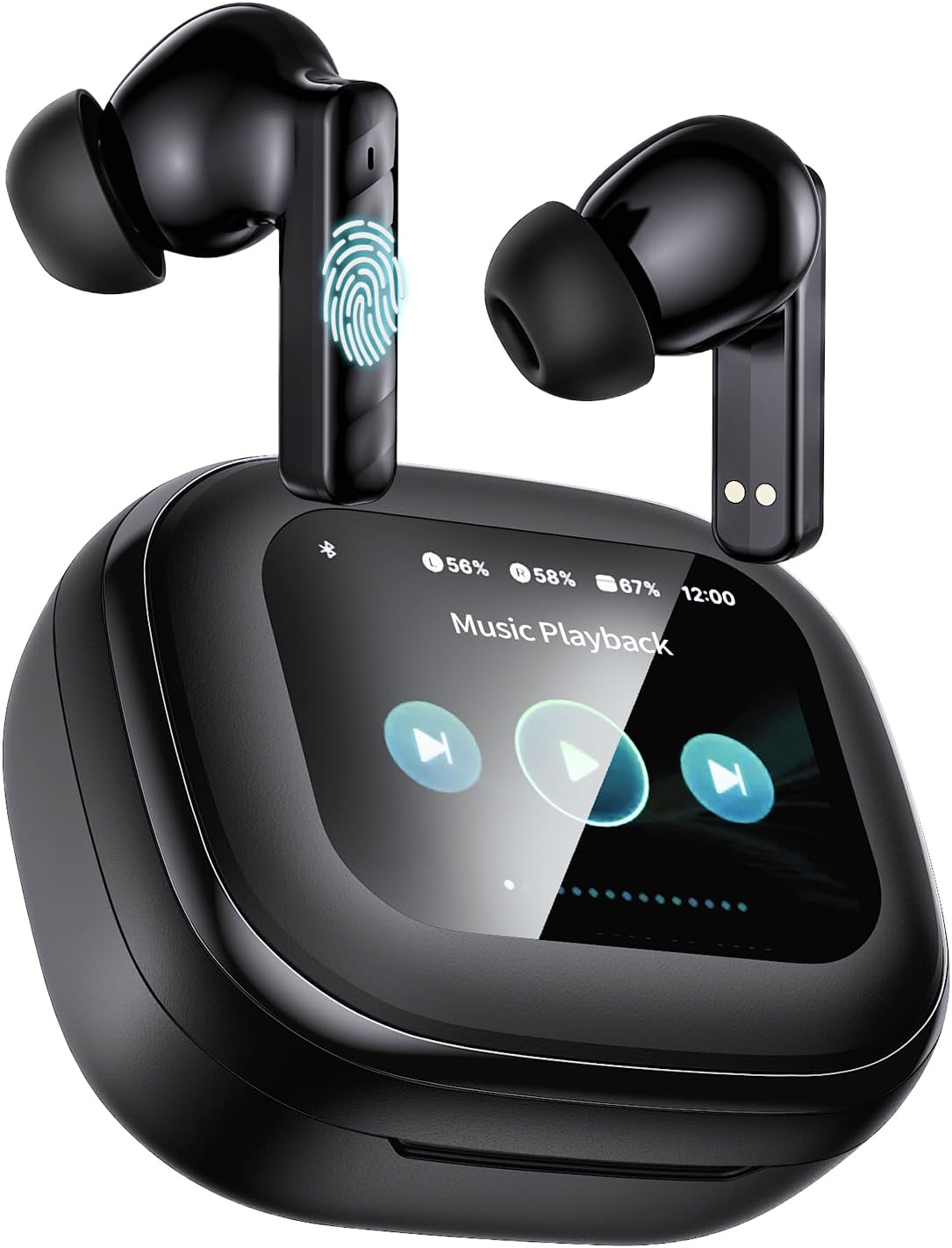
The flat top of each stem bud is a touch pad. A tap, a double tap or a long press runs your music, answers calls and wakes Siri or Google, so the phone can stay in your pocket.

Freshly checked September 2026
Quick answer

On most stem pairs, one tap plays or pauses and answers a call, two taps skip a song, and a longer press or a triple tap wakes the voice assistant. Volume works by a hold, a triple tap or a swipe, depending on the model. The i12 TWS earbuds manual, the small card in the box, has the exact map for your pair.

  • Tap the flat upper part of the bud, not the stem tip
  • Use the soft pad of a finger; nails and gloves don't register
  • Touchscreen cases put the same controls on the case
1 TAGRY X08
Touch either bud for everything TAGRY X08
The TAGRY X08 handles music, volume, calls and the voice assistant from either side.
  • Silicone tips seal out street noise
  • Case shows the battery in digits
  • Bluetooth 5.x · 60h with case
Grab this pair
2 Bucephalus T20 Touchscreen
Controls on a screen instead Bucephalus T20 Touchscreen
The Bucephalus T20 case screen sets volume, skips tracks, answers calls and finds a lost bud.
  • Silicone tips seal out street noise
  • Touchscreen case runs the music
  • Bluetooth 5.4 · 48h with case
Grab this pair
3 PMOPDSNNE 40H Earbuds
Swipe for volume PMOPDSNNE 40H Earbuds
On the PMOPDSNNE 40H Earbuds a swipe on the bud turns the sound up or down.
  • Silicone tips seal out street noise
  • Case shows the battery in digits
  • Bluetooth 5.3 · 40h with case
Grab this pair

Find the touch pad on each stem bud

Stem earbuds hide their controls in plain sight. The flat, slightly wider part at the top of each bud carries a small touch sensor, and that is where every tap should land.

The sensor is capacitive, like a phone screen. It reads the soft pad of a fingertip, so a fingernail, a glove or a sleeve pulled over your hand usually will not register. The zakotu I66 maker says the exact touch spot sits on the upper part of the bud's surface, and most stem pairs follow the same layout.

How to use i12 TWS earbuds without stray taps

  • Tap lightly. A firm press pushes the bud into your ear and can be read as a long press.
  • Keep a steady rhythm for double and triple taps, about as fast as a double click on a mouse.
  • Hold the stem, not the head, when you adjust the fit, so you don't pause the music by accident.
  • Dry your fingers after a swim or a sweaty set; water on the pad can trigger stray taps.

Many pairs, including the TAGRY X08, BESNOOW I53, XIAOWTEK S66 and Jxrev J51, put a sensor in both buds. The left and right sides often carry different jobs, such as next track on one side and previous track on the other.

Prefer something you can feel? The Jrwaro S13 uses physical buttons instead of touch pads, so a brush of the hair never pauses a song.
Cheat card

What each pair lets you control

PairControl typeWhat it runs
TAGRY X08Touch, either budMusic, volume, calls, voice assistant
PMOPDSNNE 40H EarbudsTouch and swipePlay, pause, tracks, calls, voice assistant; swipe for volume
zakotu I66Touch, upper part of the budPlay, pause, tracks, volume, calls, voice assistant
Harper 5.0 ProTouch, programmablePause, skip, calls and more, set to your liking
1 Hora AUT201TouchPlay, pause, skip, answer calls, Siri or Google Assistant
Jrwaro S13Physical buttonsMusic and calls with a click, no touch pad
Bucephalus T20Touchscreen caseVolume, tracks, calls, find buds, listening modes, EQ, camera remote
CuiSuto M28Touchscreen caseVolume, tracks, calls, find buds, four noise modes, five EQ modes
T21 Touchscreen EarbudsTouchscreen caseVolume, tracks, find buds, camera remote; buds with hybrid ANC, transparency and five EQ presets

Functions as each maker lists them. Tap counts for each function are printed on the card that ships with the pair.

Play, pause and skip a song with taps

Music controls are the ones you will use a hundred times a day. Most stem pairs share a similar pattern, though the exact taps vary from model to model.

You want toGesture on many stem pairs
Play or pauseOne tap on either bud
Next trackDouble tap, often on the right bud
Previous trackDouble tap on the left bud, or a long press
Voice assistantTriple tap or a long press

Treat that as a starting point, and let the card that ships with your pair settle the details. The quickest way to learn is to play a playlist and try each gesture once while looking at the phone screen.

  • A tap that pauses on the right but does nothing on the left means the left side carries other jobs.
  • Skipping works in music and podcast apps; most video apps ignore it.
  • If one side never reacts, check it is connected and charged before blaming the sensor.

The TAGRY X08 lets you control playback from either bud, which is handy if you always reach up with the same hand. The taps behave identically whether the buds are paired to iOS or Android.

Lost the card? Keep a note on the phone with your pair's four or five gestures. After a week of commutes the taps become muscle memory, and the note never gets opened again.

Bud vs bud

Taps, swipes, buttons and screens compared

TAGRY X08 TAGRY X08 Bucephalus T20 Touchscreen Bucephalus T20 Touchscreen PMOPDSNNE 40H Earbuds PMOPDSNNE 40H Earbuds CuiSuto M28 Touchscreen CuiSuto M28 Touchscreen T21 Touchscreen Earbuds T21 Touchscreen Earbuds Jrwaro S13 Jrwaro S13
FitIn-ear tipsIn-ear tipsIn-ear tipsIn-ear tipsIn-ear tipsOpen fit
BluetoothBluetooth 5.xBluetooth 5.4Bluetooth 5.3Bluetooth 5.4Bluetooth 5.3Bluetooth 5.4
Battery with case60h with case48h with case40h with case60h with case40h with case48h with case
CaseLED displayTouchscreenLED displayTouchscreenTouchscreenLED display
Water ratingIPX5—IPX7—IPX7IPX7
Call mics—ENC call mics——ENC call mics—
ControlsTouchTouchTouchTouchTouchButtons
Grab this pair Grab this pair Grab this pair Grab this pair Grab this pair Grab this pair
Spec card

Spec cards for the top three

TAGRY X08
TAGRY X08
Model
TAGRY X08
Fit
In-ear stem buds, silicone tips (S/M/L)
Bluetooth
Bluetooth 5, about 10m (33ft) range
Auto-connect
Hall switch: buds reconnect when the lid opens
Driver
13mm dynamic, triple-layer composite diaphragm
Impedance
32 ohm
Sensitivity
99dB
Frequency range
20Hz to 20kHz
Playtime per charge
Up to 6 hours
Total with case
Up to 60 hours (one bud at a time)
Case battery
470mAh, about 4 extra full charges
Charging
USB-C cable or any Qi wireless pad
Pair notes →Grab this pair
Bucephalus T20 Touchscreen
Model
Bucephalus T20
Fit
In-ear stem buds, silicone tips
Case
Smart touchscreen case
On-screen controls
Volume, tracks, calls, find buds, listening modes, camera remote
Bluetooth
Bluetooth 5.4, about 33ft (10m) range
Latency
About 60ms
Driver
13mm dynamic
Impedance
32 ohm
EQ modes
Bass, Rock, Pop, Classical, Jazz
Noise control
ANC for listening, ENC for calls
Playtime per charge
Up to 6 hours
Total with case
Up to 48 hours
Pair notes →Grab this pair
PMOPDSNNE 40H Earbuds
Model
PMOPDSNNE 40H Earbuds
Fit
In-ear with silicone tips
Bluetooth
5.3
Driver
13mm dynamic, composite diaphragm
Microphones
Dual noise-reduction mics
Noise control
Passive isolation from the tips
Controls
Touch taps plus swipe for volume
Call controls
Answer, reject, hang up
Playtime per charge
Up to 8 hours
Total with case
40 to 46 hours
Case display
LED battery digits
Case charging
USB-C, about 1.5 hours to full
Pair notes →Grab this pair

Answer, end or reject a call from the bud

Call controls save you from digging the phone out of a bag. Every pair here with a microphone handles incoming calls from the touch pad.

  1. Answer: usually one tap on either bud when you hear the ringtone.
  2. Hang up: usually one tap again during the call, or a double tap on some pairs.
  3. Reject: usually a long press of about two seconds while it rings.

During a call, the microphone in each bud picks up your voice. Pairs with ENC call mics, such as the Btootos A90 Pro, the Jxrev J53 and the Fhumsh A10, filter out background noise so the other person hears you, not the street.

Want to take a call on one bud only? Leave the other in the case. Mono-capable pairs such as the zakotu I66 and TAGRY X08 keep the call going on the bud in your ear.

  • Allow the Bluetooth pairing prompt to share contacts if you want caller names announced.
  • On a laptop, pick the earbuds as the microphone in the call app, or it may keep using the built-in mic.

Missed the tap and the call went to voicemail? Most phones also let you answer on screen while the sound stays in the earbuds, so nothing is lost. Tapping twice in a hurry is the classic slip, since a double tap during a ring can reject the call on some pairs.

Happy pick

Run the music from the case screen

CuiSuto M28 Touchscreen
Best for skipping taps altogether CuiSuto M28 Touchscreen

The CuiSuto M28 case has a touch screen that sets the volume, skips tracks, handles calls, finds a lost bud and switches between four noise-cancelling modes and five EQ presets. It pairs over Bluetooth 5.4 and runs up to 60 hours with the case.

Grab this pair

Turn it up and call Siri or Google

Volume is where stem pairs differ the most. Some use a long press, some a triple tap, and the PMOPDSNNE 40H Earbuds use a swipe along the bud.

How to adjust volume of i12 TWS earbuds

Check the card for your model, then try it with music playing at a low level. If a pair's map leaves volume out, the phone's own buttons always work, and the buds follow them.

Getting the voice assistant to answer

  • iPhone: in Settings, Siri, turn on Siri and allow it when locked, or the tap will do nothing with the screen off.
  • Android: in Settings, Apps, Default apps, Digital assistant app, choose Google or your preferred assistant (menu names vary by maker).
  • Tablets: an iPad or Android tablet uses the same settings as the matching phone.

The earbuds don't listen for a wake word themselves. The tap simply tells the phone to open its assistant, which then uses the earbud microphone to hear you.

A few pairs let you change the map. The Harper 5.0 Pro has programmable touch controls, so pause, skip and call actions can go where your fingers expect them.

On most phones, the volume gesture on the bud and the phone's own slider are one and the same control. Turn it up on the bud and the slider on screen moves with it.
Pictured

Plain lid, digit display or touchscreen

Stem-style earbud models by case type, September 2026. Touchscreen cases add a second set of controls on top of the taps on the buds.

Let a touchscreen case take over the tapping

If tapping your ear never feels natural, a touchscreen case moves the controls somewhere easier to see. Three stem pairs put a small touch screen on the front of the case.

  • Bucephalus T20: volume, track skips, calls, find-my-buds, listening modes, five EQ modes and a phone camera remote, with ANC on the buds.
  • CuiSuto M28: volume, tracks, calls and a locator, plus four noise-cancelling modes and five EQ presets, with up to 60 hours in total.
  • T21 Touchscreen Earbuds: more than ten case functions, including volume, tracks, the locator and a camera remote, on IPX7 buds with hybrid ANC and a transparency mode.

The screen works while the buds are in your ears and the case is in your hand or on the desk. The taps on the buds still work too, so you can mix the two. The bud locator earns its place at home, for the evening one bud rolls off the table and disappears somewhere under the sofa.

The trade-off is size and charge. A screen sips a little of the case's stored charge, and the case is chunkier than a plain flip-top.

SetupBest when
Taps on the budYou want the smallest case and hands-free control
Buttons on the budAccidental taps annoy you
Touchscreen caseYou like seeing what you press, or need a bud finder

Whichever you choose, the pairing steps stay the same, and the charging tips cover the case.

Quick answers

First-pair questions

How do I use i12 TWS earbuds?

Open the case, pair them once through your phone's Bluetooth menu, then control them with taps on the flat top of each bud: one tap to play or pause, two to skip on most pairs.

How do I adjust the volume on i12 TWS earbuds?

It depends on the model: a long press, a triple tap or a swipe on the bud. If your pair has no volume gesture, the phone's volume buttons control the earbuds.

Why do my earbuds pause when I touch them?

The touch pad sits on the upper part of the bud. Hold the stem when you adjust the fit, and dry your fingers after sweating or swimming.

How do I activate Siri with touch control?

Turn on Siri in the iPhone's Settings and allow it when locked, then use your pair's assistant gesture, usually a triple tap or a long press.

Can I change what each tap does?

On most pairs the map is fixed. The Harper 5.0 Pro is one pair with programmable touch controls.

Next quick fix

More earbud fixes

More pairs

More pairs with easy tap controls