Best pairs
Touchscreen-case i12-style buds · ANC · Bluetooth 5.4

Bucephalus T20 Touchscreen

Stem earbuds whose case has its own color touchscreen: change songs, turn it up, switch noise cancelling and find a lost bud without unlocking your phone.

  • CaseBuilt-in color touchscreen
  • NoiseANC for music, ENC for calls
  • Sound13mm drivers, 5 EQ modes
  • Battery6h per charge, 48h with the case
  • Bluetooth5.4, about 33ft
  • FitIn-ear, silicone tips
Lovely for
  • You want to control music without pulling out your phone
  • You like switching noise cancelling on for trains and flights
  • You want EQ presets without installing an app
  • You lose buds and like a find feature on the case
Skip if
  • You want sweat-proof buds with a stated water rating
  • You prefer the open, tip-free i12 fit
  • You want the most hours per bud charge
Grab this pair

Run the music from the T20's touchscreen case

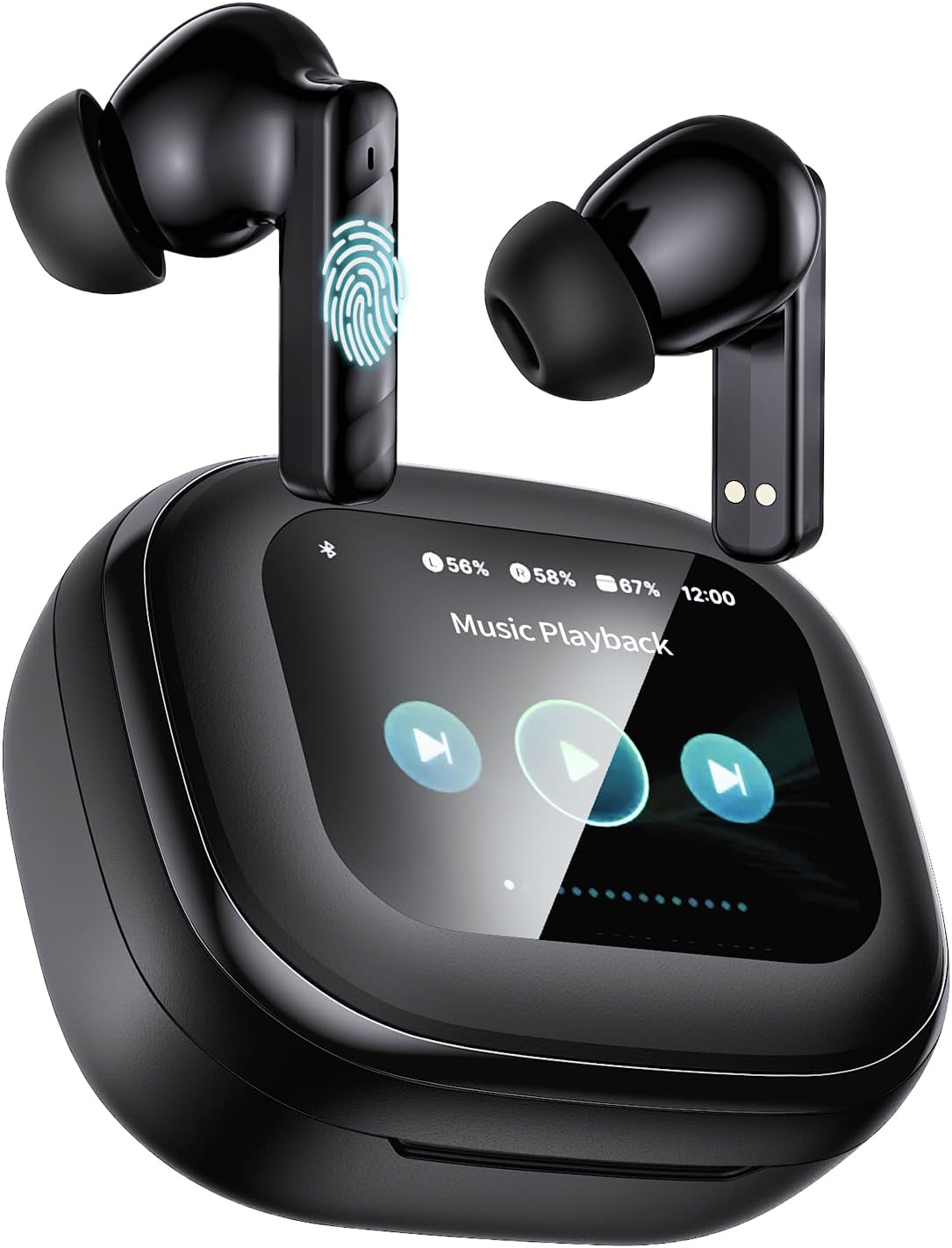
The Bucephalus T20 puts a small color touchscreen on the front of its charging case, and that screen becomes a remote for the buds. You can turn the volume up, skip or go back a song, answer a call and switch listening modes with a swipe and a tap on the case. No app to install, no phone to unlock.

The screen also shows the battery left in each bud and in the case as percentages, so a quick glance before you leave the house tells you whether to charge.

What the T20 case can do from its screen:

  • Volume: up and down without touching your ears or phone.
  • Tracks: play, pause, next and previous.
  • Calls: pick up or end a call from the case.
  • Listening modes: switch noise cancelling and the EQ presets.
  • Find my buds: help locate a bud that has rolled under the sofa.
  • Camera remote: take a photo on your phone from a distance, handy for group shots.
Why a screen helps: tapping an earbud to change volume can push it deeper or loosen the fit. With the T20, the buds stay put and your thumb does the work on the case.

The buds keep their own touch controls too, so you can still tap to pause when the case is in a bag. The usual stem-bud tap patterns are on the touch-control cheat card, and the screen menus follow the same functions.

For someone buying a first pair, the screen also makes things less mysterious. There are no blinking-light codes to decode: the case tells you in words and numbers what the buds are doing.

Spec card

Every number on the box

SpecValue
ModelBucephalus T20
FitIn-ear stem buds, silicone tips
CaseSmart touchscreen case
On-screen controlsVolume, tracks, calls, find buds, listening modes, camera remote
BluetoothBluetooth 5.4, about 33ft (10m) range
LatencyAbout 60ms
Driver13mm dynamic
Impedance32 ohm
EQ modesBass, Rock, Pop, Classical, Jazz
Noise controlANC for listening, ENC for calls
Playtime per chargeUp to 6 hours
Total with caseUp to 48 hours
Charge timeAbout 1.5 hours
ControlsTouch on the buds, plus the case screen
CompatibilityiPhone, Android phones, tablets, other Bluetooth devices
Case size and weightAbout 3 × 2.5 × 1.5in, 1.5oz
ColorPearl white
In the boxEarbuds, charging case, cable, ear tips, manual

Switch T20 noise cancelling on from the lid

The T20 carries ANC, active noise cancelling, which uses microphones to hear steady outside noise and play an opposite sound wave to cancel much of it. That is different from most budget stem buds, which only block noise with their tips.

ANC works best on low, constant sounds: the hum of a plane, the rumble of a bus engine, an air-conditioning unit. It does less against sudden sounds such as voices or a door slamming, and the silicone tips help there by sealing the ear.

When to switch modes on the case screen:

  1. Commute or flight: turn noise cancelling on and keep the volume lower.
  2. Walking near traffic: switch it off so you hear what is around you.
  3. Quiet office: leave it off to save battery.
  4. Calls: ENC cleans up your voice for the other person whatever the listening mode.

Noise cancelling uses a bit of extra power, which is part of why Bucephalus rates the buds at up to 6 hours per charge. The case holds enough for a total of 48 hours, and a full case charge takes about 1.5 hours.

A good habit with ANC pairs is to switch noise cancelling off when you only need background music at a desk. The buds last longer between charges, and you still hear a colleague who stops by. Turn it back on for the ride home.

The T20 links over Bluetooth 5.4 to iPhones, Android phones and tablets at up to about 33 feet, with a delay of around 60 milliseconds. That keeps voices in sync on videos. The pairing steps show how to connect the first time, and the screen confirms when both buds are linked.

Among the pairs

Where this pair lands

i12 TWS earbuds models by fit and case, September 2026. Highlighted: Bucephalus T20 Touchscreen.

Five EQ presets shape the T20's 13mm sound

Plenty of budget earbuds give you one fixed sound. The T20 ships with five EQ modes you pick from the case screen: Bass, Rock, Pop, Classical and Jazz. Each one shifts the balance of the 13mm drivers to suit a style of music.

  • Bass: extra low end for hip-hop, electronic and workout mixes.
  • Rock: punchier drums and guitars with a touch more treble.
  • Pop: brings vocals forward for chart music and podcasts.
  • Classical: a flatter, more open balance for orchestras and piano.
  • Jazz: warm mids for horns, double bass and vocals.

You do not need an app for any of this, which keeps things simple on a phone that is short on storage. Try each preset with a song you know well, then leave it on the one you like best.

Like every sealed bud, the T20 needs a good tip fit for the EQ to make sense. If the Bass preset still sounds thin, try a larger tip before blaming the drivers. A proper seal also makes ANC far more effective.

Care note: Bucephalus does not quote a water rating for the T20. Treat it as an everyday pair for commuting, work and travel, and keep it away from heavy sweat and rain. For the gym, an IPX7 pair is the safer choice.

Presets also help with different content. Podcasts and audiobooks usually sound clearest on Pop, which lifts voices, while films on a tablet often suit Bass for explosions and scores.

The case is about 3 × 2.5 × 1.5 inches and 1.5 ounces, a little larger than a plain case because of the screen. It still fits a jacket pocket. Keep it in a separate pocket from keys so the screen stays scratch-free.

Trade-ins

Three other pairs to try

1 CuiSuto M28 Touchscreen
Longest touchscreen battery CuiSuto M28 Touchscreen
The CuiSuto M28 also has a touchscreen case, on Bluetooth 5.4, with up to 60 hours in total.
  • Silicone tips seal out street noise
  • Touchscreen case runs the music
  • Bluetooth 5.4 · 60h with case
Grab this pair
2 T21 Touchscreen Earbuds
Touchscreen plus IPX7 T21 Touchscreen Earbuds
The T21 Touchscreen Earbuds add an IPX7 rating, ENC call mics and 14.2mm drivers.
  • Silicone tips seal out street noise
  • Touchscreen case runs the music
  • Bluetooth 5.3 · 40h with case
Grab this pair
3 Btootos A90 Pro
Simpler, sweat-proof Btootos A90 Pro
The Btootos A90 Pro skips the screen for an LED case, IPX7 and 14.2mm drivers on Bluetooth 5.4.
  • Silicone tips seal out street noise
  • Case shows the battery in digits
  • Bluetooth 5.4 · 36h with case
Grab this pair

Weigh the T20 against other touchscreen pairs

The T20 is one of several stem-earbud pairs with a screen on the case. All of them offer noise cancelling from the screen. The T20's extras are five EQ presets and a camera remote; the others win on battery or water resistance, so the right one depends on how you listen.

Bucephalus T20CuiSuto M28T21 Touchscreen
Screen caseYesYesYes
NoiseANC and ENCANC, four modesHybrid ANC, ENC calls
With case48h60h40h
WaterNot statedNot statedIPX7
Bluetooth5.45.45.3

How to choose:

  • Pick the T20 for five EQ presets and a camera remote alongside ANC and ENC.
  • Pick the CuiSuto M28 if battery life is the priority.
  • Pick the T21 Touchscreen if the buds will see sweat and rain.

Like the idea of a smart case but mostly want long, sweat-proof listening? A digit-display pair such as the BESNOOW I53 or the Btootos A90 Pro covers that at a gentler price level. For a look at how touchscreen cases compare across price bands, see the i12 price bands.

One more thing to think about is how you carry the case. A screen case is a small gadget in its own right, so it pays to keep it out of the pocket that holds your keys or coins. Many owners slip it into a soft pouch or a separate jacket pocket, and the screen stays clear and easy to read for years.

For commuters who want quiet on the train and hate fiddling with their phone, the T20 is a fun and practical pick.

Quick answers

Before these go in your ears

What can the Bucephalus T20 case screen do?

Change volume, play, pause and skip, answer calls, switch listening modes and EQ, help find the buds and act as a camera remote.

Does the T20 need an app?

No. Every setting, including noise cancelling and the five EQ presets, is on the case screen.

Does the Bucephalus T20 have noise cancelling?

Yes. It has ANC for listening and ENC to keep your voice clear for callers.

How long does the T20 battery last?

Up to 6 hours per charge and up to 48 hours with the case. The case recharges in about 1.5 hours.

Is the T20 waterproof?

Bucephalus does not state a water rating, so keep it away from heavy sweat and rain.